
Description
Game Introduction
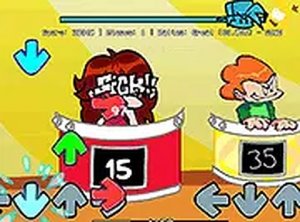
No Brainer Rhythm Challenge is a fan-made browser game that brings the popular song No Brainer by Sleepy Oreo into an interactive music experience. Inspired by classic rhythm games, the core objective is to follow the beat by pressing the correct keys in time with the music. This version offers a family-friendly challenge that tests your timing and reflexes. Its catchy soundtrack and vibrant visuals capture the spirit of the original mod, making it an engaging experience for both longtime fans of rhythm games and newcomers. The game is designed to be simple to pick up but rewarding to master, providing a fun way to enjoy music while improving your coordination. It is free to play directly in your browser with no downloads required, and a full screen mode is available for a more focused experience. The controls are straightforward, using only the arrow keys, making it accessible to players of all ages.
How to Play
Players use the arrow keys on their keyboard to match on-screen prompts that appear in rhythm with the music. The goal is to hit each note accurately to score points and keep the performance going. A mouse can be used for navigating menus. The game is designed for desktop computers, and for a more immersive experience, players can switch to full screen mode. The controls are simple to learn, but mastering the timing is key to achieving high scores. As a rhythm game, the primary challenge is to stay synchronized with the beat, which requires focus and practice.
Game Features
This game offers catchy rhythm gameplay that tests your timing and reflexes. It is free to play directly in your browser with no downloads required. A full screen mode is available for a more focused experience. The controls are straightforward, using only the arrow keys. As a fan-made mod, it brings a popular song into a new interactive format, providing a fresh twist on classic rhythm game mechanics. The game may include adjustable speed settings to help players learn at their own pace.
Tips for Success
Practice regularly to improve your sense of timing and rhythm. Start by playing at a slower pace if the game offers adjustable speed settings. Focus on accuracy rather than speed, as consistent note hits build higher scores. Take short breaks to avoid fatigue and maintain concentration. Listen carefully to the music to anticipate note patterns. Finally, stay relaxed and enjoy the beat—it helps keep your movements smooth and precise.







Player Comments
Sign in to comment
You must be logged in before posting a review or rating.
No account? Create one
No comments yet. Be the first to comment!