
Description
Game Introduction
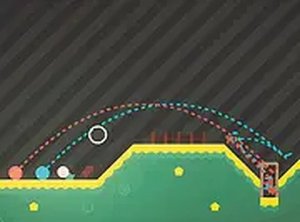
Goolf! is a creative and challenging online puzzle game that reimagines the classic sport of golf. Instead of controlling a single ball, you must guide two golf balls simultaneously into the same hole. This simple change adds a layer of strategy and coordination not found in standard golf games. The game is free to play directly in your browser, requiring no downloads or installations. It is designed for desktop use, ensuring smooth performance with a mouse or keyboard. Each level presents a new layout, testing your ability to judge angles, power, and timing. The goal is always the same: putt both balls into the hole at the same time. This family-friendly puzzle game is suitable for players of all ages who enjoy a thoughtful and engaging challenge.
How to Play
To play Goolf!, start by looking at the two golf balls on the green. Your task is to putt both balls into the hole at the same time. Use your mouse to click and drag from the balls. Dragging sets both the direction and power of your shot. The further you drag, the harder the shot. Release the mouse button to shoot both balls simultaneously. If you need to cancel a shot, move the cursor back to the starting point before releasing. The game is played on a desktop computer using a mouse or keyboard. You can switch to full screen mode for a more immersive experience. Practice your aim and timing to clear each level. Remember, both balls must enter the hole together for a successful putt.
Game Features
Fun 2-ball synchronous gameplay. Simple drag-and-release controls. Free to play online. Full screen mode available for better focus. The game includes a variety of level layouts that challenge your spatial reasoning and timing. As a puzzle game, it emphasizes careful planning and precise timing over speed. The classic golf theme is combined with a modern puzzle twist, making it accessible to both golf fans and puzzle enthusiasts.
Tips for Success
Focus on the angle and power of each shot equally for both balls. Since both balls must reach the hole simultaneously, you may need to adjust your aim to account for different distances or obstacles. Take your time to study the layout before shooting. Use the drag control to experiment with different power levels. If a shot fails, analyze what went wrong—was the angle off, or was the power uneven? Practice on early levels to master the dual-ball mechanic before tackling more complex puzzles.



Player Comments
Sign in to comment
You must be logged in before posting a review or rating.
No account? Create one
No comments yet. Be the first to comment!