
Description
Game Introduction
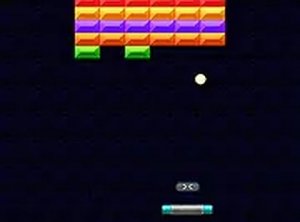
Brick Breaker Classic Puzzle is a free online arcade puzzle game that brings the timeless brick-breaking experience to your browser. The core objective is straightforward: use a paddle to bounce a ball and clear a wall of bricks. This version adds variety with different missions to complete and power-ups that help destroy bricks faster. Designed for quick sessions or longer play, it is a versatile choice for casual gamers. It runs directly in your browser on both mobile devices and desktop computers, with no downloads required. The intuitive drag controls ensure that players of all ages can pick it up and start playing immediately. Whether you have a few minutes or want to unwind for longer, Brick Breaker Classic Puzzle offers a satisfying and engaging experience that stays true to the original arcade feel.
How to Play
To play Brick Breaker Classic Puzzle, start by dragging the paddle left or right to position it under the ball. When the ball hits the paddle, it bounces upward toward the bricks. Your goal is to break all the bricks by bouncing the ball into them. If the ball falls past the paddle, you lose a life. The game ends when all lives are lost. As you play, power-ups may appear from broken bricks. Collect these to gain advantages like a wider paddle, multiple balls, or stronger hits. The game includes various missions, such as clearing a certain number of bricks or collecting specific power-ups, which add extra goals and replay value. Controls are responsive and work smoothly with touch or mouse input, making it easy to play on any device. Use full screen mode for a more immersive view.
Game Features
Simple drag controls that work on touchscreens and mice. Multiple missions provide varied challenges. Power-ups like extra balls and wider paddles enhance gameplay. Supports both mobile devices and desktop computers. Free to play with no downloads needed. Full screen mode for an immersive experience.
Tips for Success
Focus on keeping the paddle centered under the ball to react quickly to changes in direction. Try to aim the ball at the top of the brick wall to create openings and maximize brick destruction. Collect power-ups whenever possible, as they can significantly boost your progress. Practice regularly to improve your timing and paddle control. If a mission seems difficult, replay earlier levels to build skills and confidence.





Player Comments
Sign in to comment
You must be logged in before posting a review or rating.
No account? Create one
No comments yet. Be the first to comment!