
Description
Game Introduction
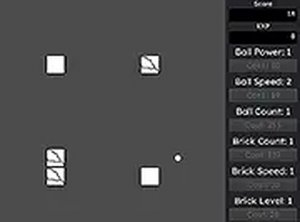
Demolition Ball Arcade Classic is a strategy-based arcade game where players control a ball with the goal of destroying blocks to accumulate points. The core objective is to reach a score of 100,000 points by efficiently smashing through various block formations. Each block hit adds to the player's score, and as points are earned, players can upgrade their ball to increase its smashing power. The game introduces a strategic cost management system: each upgrade increases the cost of all future upgrades by 2 percent, encouraging thoughtful decision-making about when and what to upgrade. Players can also add an extra ball to the field, which increases overall costs by 20 percent but allows for more blocks to be destroyed simultaneously. This game is designed for desktop play with smooth mouse controls and full-screen support, making it accessible and enjoyable for all ages. It is a family-friendly experience that focuses on simple mechanics and clear progression goals.
How to Play
To play Demolition Ball Arcade Classic, players use a mouse to control the ball. By pressing and holding the left mouse button, the ball bounces off the cursor, allowing players to direct it toward blocks. The objective is to destroy as many blocks as possible to increase the score. As points are earned, players can open the game menu to purchase upgrades for the ball. Each upgrade enhances the ball's power but raises the cost of all upgrades by 2 percent. Additionally, players can add an extra ball, which increases costs by 20 percent but enables more blocks to be destroyed at once. The game is optimized for computer use with a keyboard and mouse and is not designed for mobile devices. Using full-screen mode provides a more immersive experience. Consistent block smashing and strategic upgrades are key to reaching the 100,000-point target.
Game Features
Demolition Ball Arcade Classic offers family-friendly gameplay suitable for all ages. It features simple mouse controls with a press-and-hold mechanic that is easy to learn. The upgrade system adds a layer of strategy, as each upgrade increases the cost of all future upgrades by 2 percent, requiring careful resource management. Players can also add an extra ball, which increases costs by 20 percent but allows for more efficient block destruction. The game supports full-screen mode for an enhanced visual experience. It is free to play directly in a web browser with no downloads required, making it accessible for quick gaming sessions.
Tips for Success
To succeed in Demolition Ball Arcade Classic, focus on consistent block smashing to accumulate points steadily. Plan upgrades carefully, as each one raises the cost of future upgrades. Consider adding an extra ball only when you have enough points to offset the 20 percent cost increase. Practice controlling the ball with precise mouse movements to maximize block destruction. Regular play will help you understand the upgrade timing that works best for your style.







Player Comments
Sign in to comment
You must be logged in before posting a review or rating.
No account? Create one
No comments yet. Be the first to comment!